
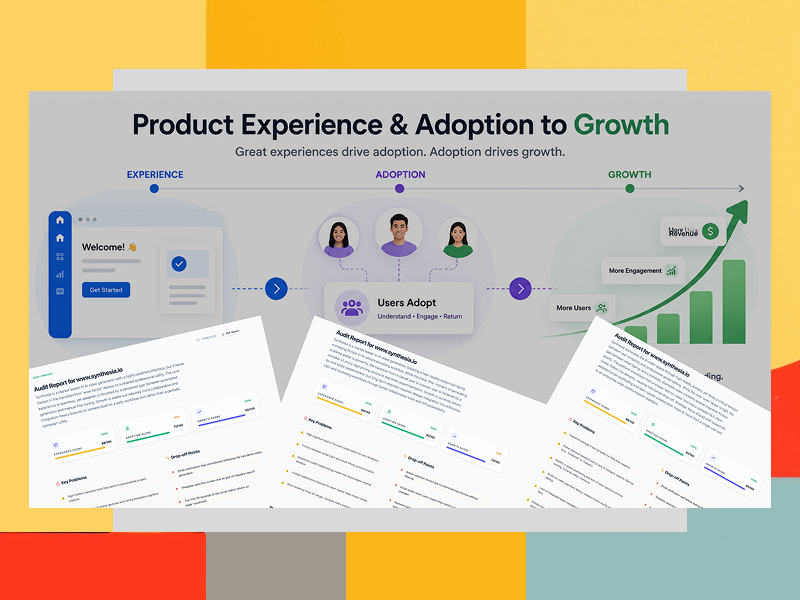
Utilizing Custom Diagnostic Ecosystem to Transform Tiered UX Strategies and Bridge the Gap Between “Wow-Factor” Demos and Sustained Product Adoption
Target Ecosystem: www.synthesia.io (Market leader in AI video generation)
Strategist Profile: Lead Product Adoption & Experience Strategist (UX + LX + Growth)
Objective: Diagnose user onboarding friction, identify critical drop-off points, and deliver an actionable framework to transform periodic creators into daily workflow power users.
From Digital Product & Learning Experience Designer to Product Experience & Adoption Strategist, who works extensively with AI-driven workflows, I use platforms like Synthesia firsthand. The initial text-to-video generation feels like magic—it is a textbook example of a high-conversion “Wow-moment.”
However, using a tool professionally is vastly different from testing a free demo. When attempting to scale production, build brand-compliant learning modules, or sync detailed visual animations to precise speech patterns, the workflow can slow down significantly.
I chose to audit Synthesia because it perfectly exemplifies a broader Product-Led Growth (PLG) paradox: a stunning core technology that faces adoption bottlenecks. After all, the experience relies heavily on the user to bridge the gap between automated generation and manual fine-tuning.
To uncover exactly where corporate creators experience cognitive overload, I ran Synthesia through my proprietary, AI-driven custom diagnostic ecosystem.
The Challenge: The “Perceived Value” Chasm
Synthesia boasts a highly polished interface and a world-class initial “Wow-moment.” However, data revealed a classic PLG (Product-Led Growth) bottleneck: adoption was being throttled. Users loved the initial automated demo, but friction accumulated rapidly when moving from automated generation to manual brand customization. The product was viewed as a “periodic campaign tool” rather than a staple of daily corporate workflows.
The Strategy: A Deep-Dive Diagnostic Framework
To deliver both immediate tactical fixes and a long-term enterprise growth map, the product’s UX was evaluated using a tiered diagnostic approach. This methodology ensures product teams don’t just patch visible symptoms but systematically fix root-cause friction based on data signals, simplicity, and user enablement.
A Three-Tiered Diagnostic Framework
To deliver immediate tactical wins while mapping out long-term enterprise scalability, I deployed a three-tiered audit methodology. This structured approach ensures product teams aren’t just looking at symptoms, but systematically tackling root causes based on implementation complexity and business impact.
1. The Quick Audit: Baseline Health Check
- Focus: Immediate high-friction roadblocks in the core user journey.
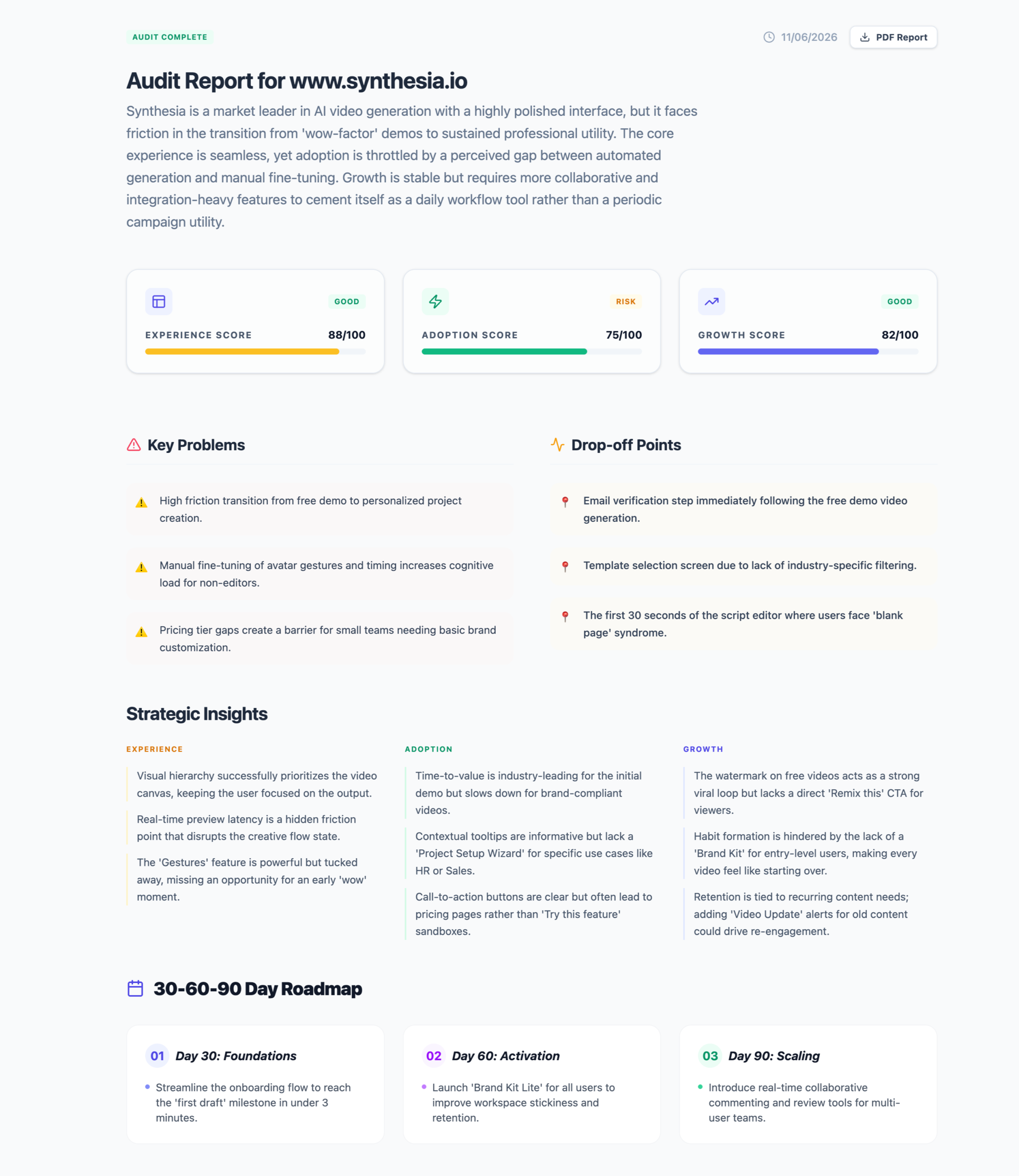
- Key Findings: Identified that the email verification step immediately following the free demo video generation killed user momentum. Additionally, users experienced “blank page syndrome” during the first 30 seconds in the script editor.
- The Baseline Scores: * Experience Score: 88/100 (Strong UI foundation)
- Adoption Score: 75/100 (Risk Area—onboarding friction)
- Growth Score: 82/100 (Healthy viral loop via watermarks, but lacking clear conversion CTAs)
2. The Standard Audit: Product-Led Priority (RP) Mapping
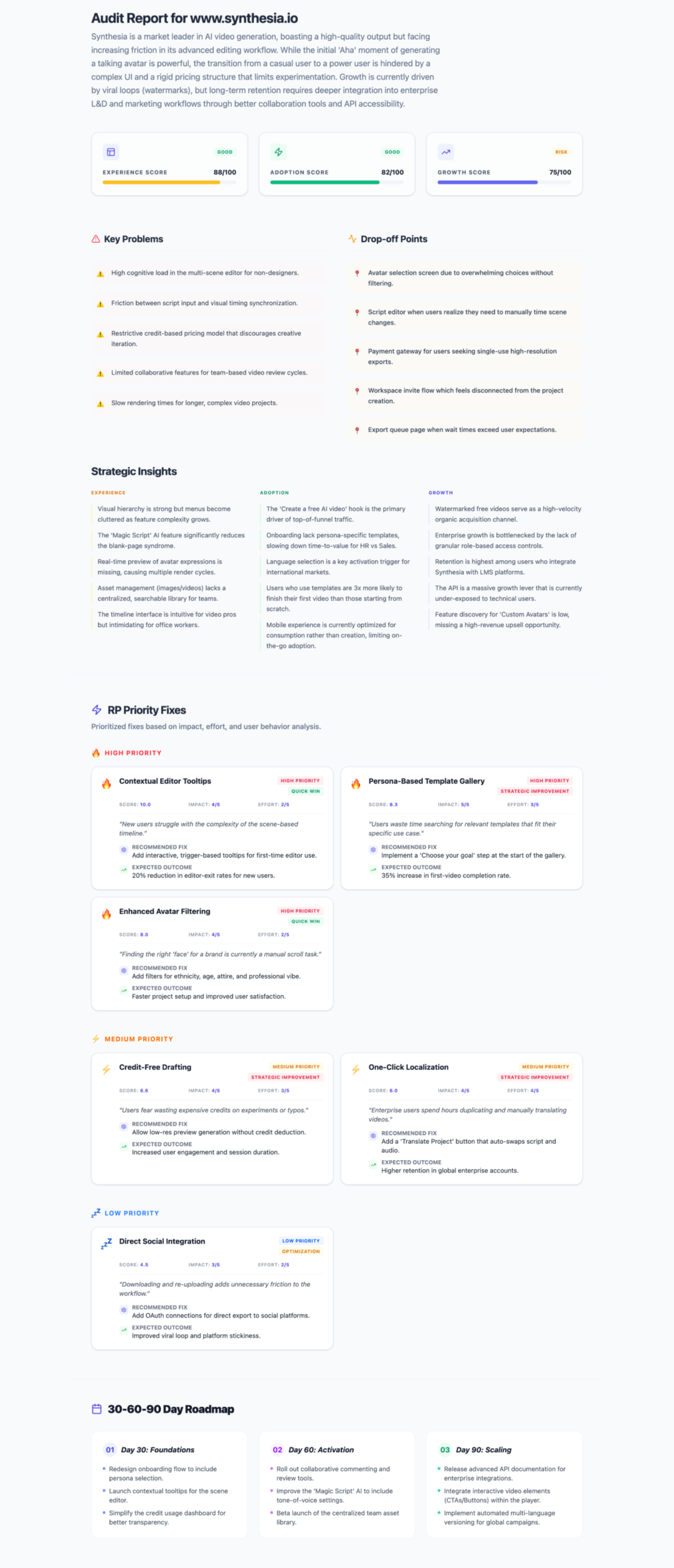
- Focus: Categorizing problems into an actionable Feature Priority Matrix (High, Medium, Low) backed by expected business outcomes.
- Strategic Recommendations Developed:
- High Priority: Contextual Editor Tooltips to reduce cognitive load during manual timeline editing, and a Personalized Template Gallery with industry-specific filtering (e.g., HR, Sales) to accelerate time-to-value.
- Medium Priority: Credit-Free Drafting to remove the anxiety of accidental credit consumption, and One-Click Localization to lean into Synthesia’s global translation strengths early in the lifecycle.
3. The Advanced Audit: Comprehensive Ecosystem Deep-Dive
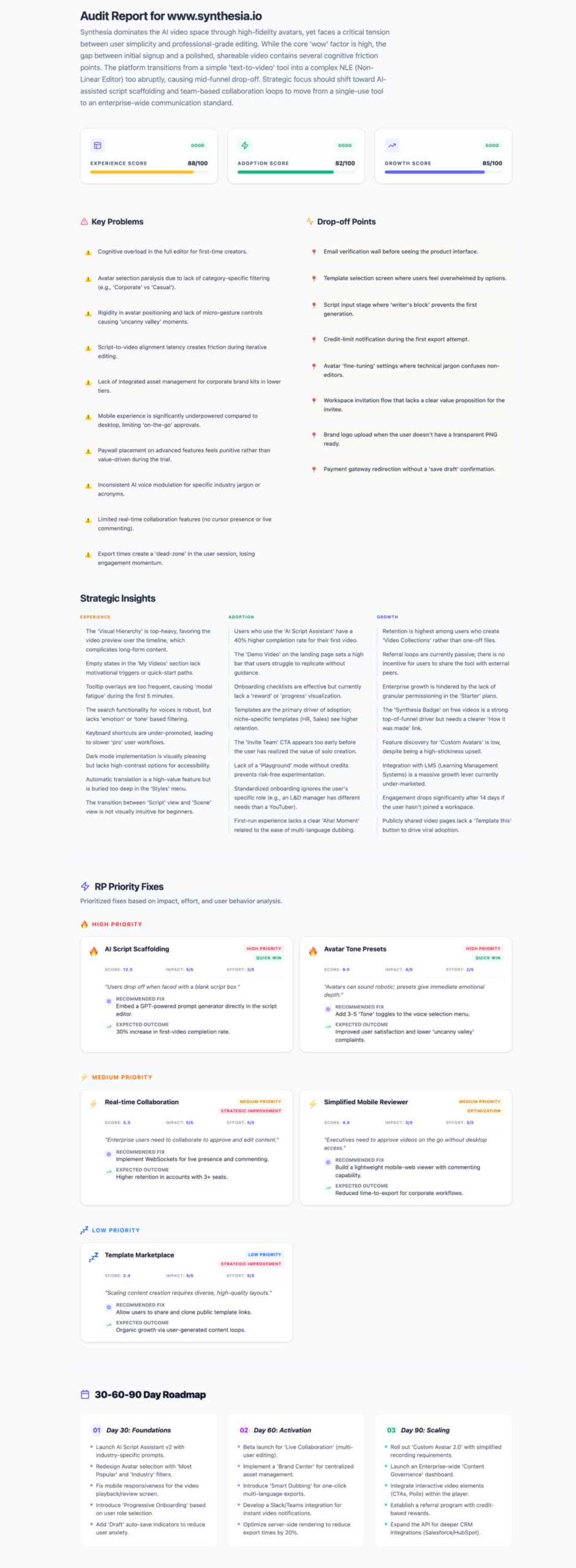
- Focus: Granular breakdown of macro-UX friction points, mapping out an aggressive, comprehensive list of drop-off points and strategic insights across Experience, Adoption, and Growth vectors.
- Key Insight: True long-term retention is tied directly to recurring enterprise content needs. Moving the needle requires shifting the product from a solitary creation tool to a collaborative ecosystem.
The initial baseline assessment evaluated the overall product health across three overarching growth vectors:
- Experience Score (88/100): A polished, visually strong studio interface layout that anchors user focus well.
- Adoption Score (75/100) — Risk Area: Initial time-to-value is incredibly fast, but adoption drops during manual project creation and template customization.
- Growth Score (82/100): Strong organic viral loops driven by video watermarks, but lacking direct enterprise collaboration triggers to anchor team-wide retention.
The Granular Diagnostic (ASCEND Audit Framework)
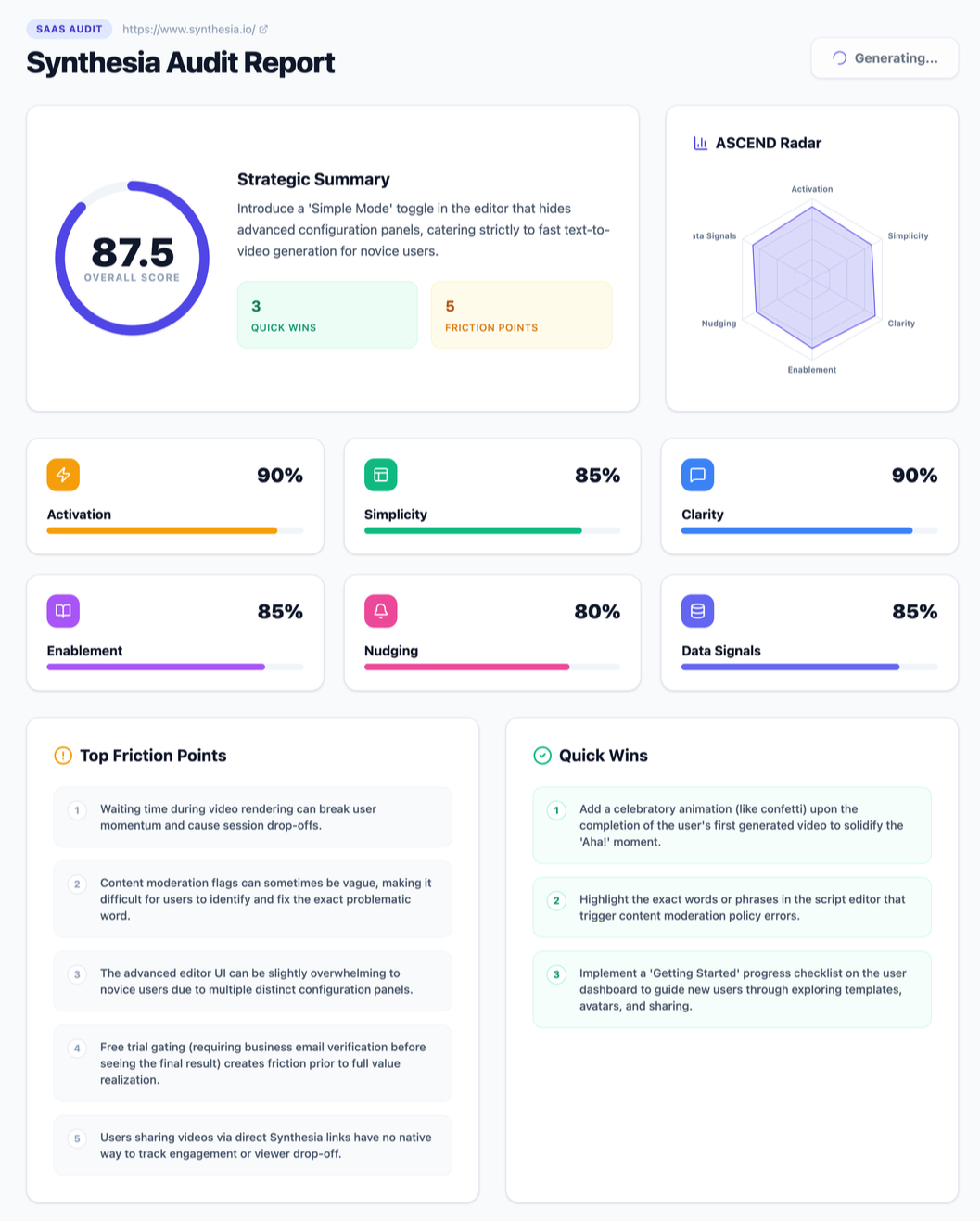
To pinpoint exactly where users lose momentum, the product was analyzed through the 6-dimension ASCEND Radar Framework, yielding a high-performing Overall Score of 87.5/100:
- Activation 90% & Simplicity 85%: While entering text is highly intuitive, sync logic can become complex for first-time users.
- Clarity 90% & Enablement 85%: Most interface labels are clean, but advanced features—like voice tuning and dictation syntax—rely on specialized formatting rather than visual UI toggles.
- Nudging 80%: The platform features minimal contextual or external loops to draw a user back once a draft is abandoned mid-creation.
- Data Signals 85%: Excellent foundational SaaS event tracking integrated to monitor standard user flows.
Key Friction Points & Dropping-Off Triggers
The dual-tool auditing process isolated five critical user experience gaps that break the creative flow state:
- The Alignment Chasm: The platform provides beautiful templates, but forces users to figure out complex text-to-video element alignment manually via trial and error.
- The “Blank Page” Syndrome: First-time users often experience friction during the first 30 seconds inside the script editor without structural layout prompts.
- Syntax Barriers: Adjusting voice modulation requires reading external documentation rather than utilizing intuitive, inline UI controls.
- The Rendering Engagement Gap: Video rendering wait times create a dead zone where users frequently navigate away from the application, breaking momentum and lowering immediate retention.
- Passive Re-engagement: There are minimal proactive, automated nudges to help creators resume ungenerated drafts left sitting in workspaces.
Strategic Recommendations & Prioritized Fixes
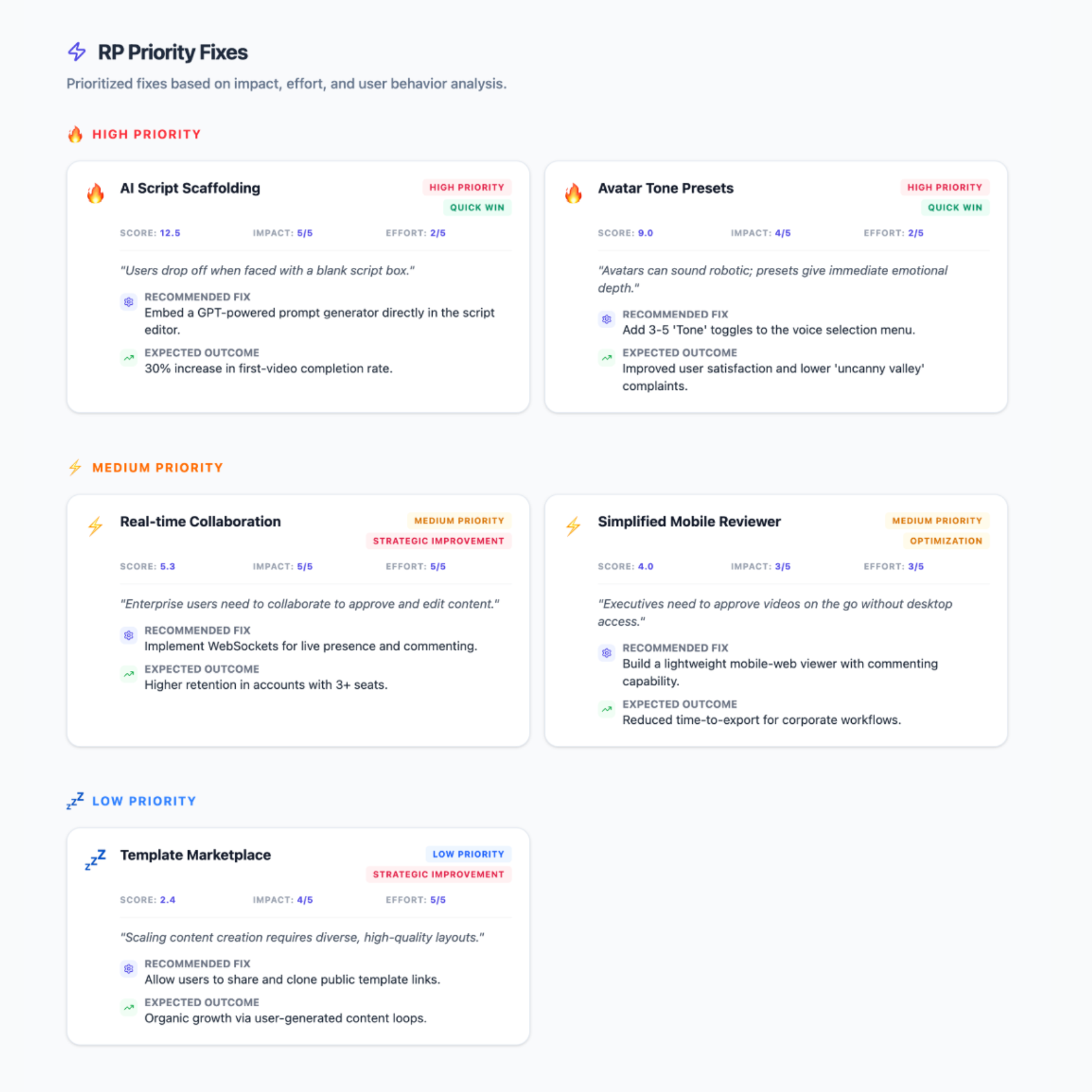
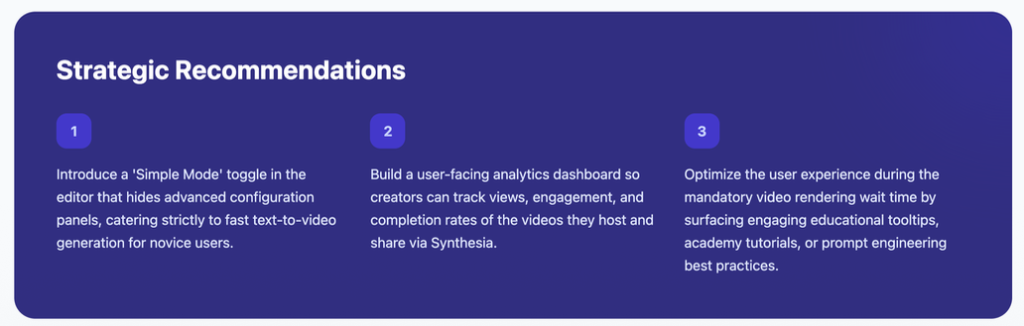
By converting these friction points into product-led growth opportunities, the following prioritized enhancements were engineered to drive immediate user activation and long-term retention:
High-Priority Wins
- Interactive Tooltip Tour: Embed a contextual, 3-step studio onboarding wizard upon first login to orient the user within the editor workspace.
- Timeline Auto-Sync: Introduce an automated timeline syncing feature for text and visual assets to completely remove manual trial-and-error alignment.
- Inline Voice Hints: Replace syntax-heavy documentation with clean, inline contextual tooltips directly inside the script editor for voice tuning features.
Medium to Low-Priority Growth Drivers
- AI-Driven Asset Recommendations: Leverage the script text to automatically suggest relevant video backgrounds, media assets, or contextual avatars.
- In-App Wait-Time Loops: Transform the video rendering “dead zone” into an engagement engine by serving advanced prompt-crafting guides, community video showcases, or product micro-learning tips.
- Automated Abandonment Nudges: Trigger an automated email or tailored in-app notification when a draft remains ungenerated for over 24 hours to guide users back to completion.
The Strategic Roadmap: 30-60-90 Day Execution
To transform these diagnostic insights into high-velocity product execution, the recommendations are organized into a phased, engineering-ready roadmap:
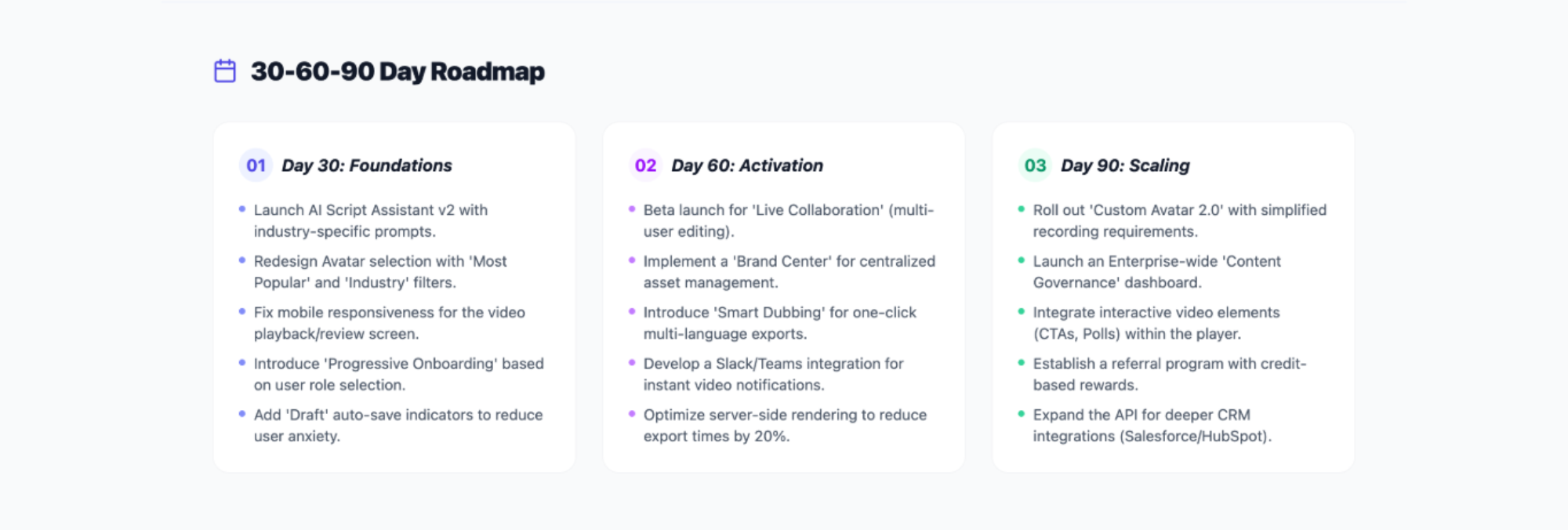
Day 30 (Foundations): Focus on immediate activation. Implement the dashboard onboarding checklist, inject contextual editor tooltips, and simplify the workspace interface so a user completes their first video draft in under 3 minutes.
Day 60 (Activation): Move from baseline usage to active habit formation. Launch a lightweight “Brand Kit” feature for standard tiers, roll out auto-sync timeline editing, and activate automated email nudges to recover abandoned user drafts.
Day 90 (Scaling): Target enterprise expansion through product-led growth. Introduce advanced multi-user collaboration tools like inline commenting, shared workspace libraries, and public API access to fully integrate the tool into corporate learning tech stacks.
Bringing Product Strategy to Life: How My Custom Audit Ecosystem Helps You Scale
When assessing high-growth SaaS applications, standard analytics tell you what users are doing—but they rarely explain why they are dropping off.
This case study showcases how my custom-built auditing system bridges that gap. By combining deep UX heuristics with an actionable growth strategy, these tools systematically deconstruct complex digital products into clean, scannable priority matrices.
They transform design debt into structured engineering roadmaps, ensuring your product design resources are spent exclusively on features that drive activation, maximize retention, and scale annual recurring revenue (ARR)
Is your product experience misaligned with your growth goals?
🚀 Limited Time Offer: Share your product details and receive a one-on-one experience and adoption improvement.
Let’s build your product’s experience and adoption roadmap together
I help B2B and PLG SaaS companies pinpoint hidden user friction, optimize activation funnels, and design end-to-end product experiences that turn casual testers into lifelong power users.